 Precast
Your co-host
- Before
- A voice memo at midnight: “that tangent in the middle, maybe cut it?”
- With Precast
- A Content & Structure marker at 18:40: “Tangent runs two minutes. Cut to 20:35.”
Your podcast's final check
Precast is the review step for podcasts. Invite your co-host, guest or client, and every note comes back pinned to the exact second.
Free for one episode a month. Reviewers never need an account.
Precast · 4 markers
Sponsor read runs long. Trim the second half.
Guest's name mispronounced. Retake the intro line?
Phone buzz under the guest's answer.
Says 2019. It was 2021.
Try it as a reviewer
This is what your reviewers see in their browser. Press play and tap a category when something catches your ear.
Turn on JavaScript to add markers while you listen.
No markers yet. Play the episode and use the buttons above to add one.
Now imagine your co-host, guest and client did that, every marker landing on your dashboard at the exact second.
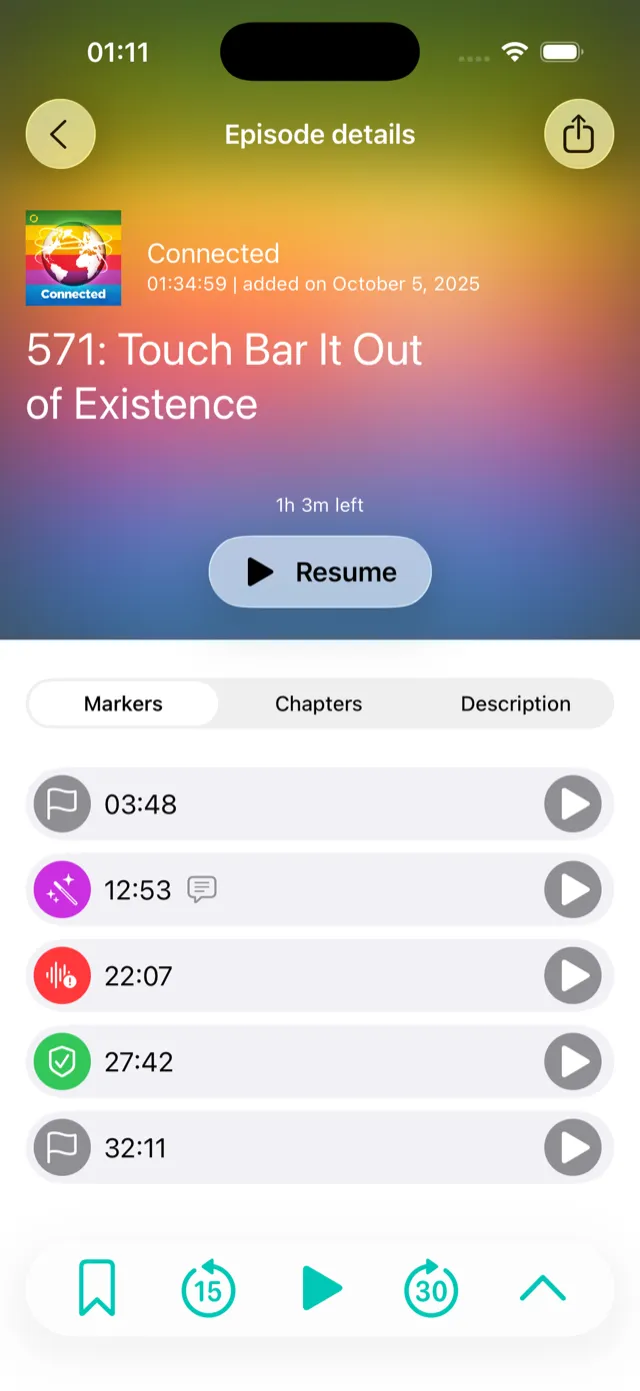
The Precast iPhone app is made for listening anywhere: drop a marker from the Lock Screen, a widget or CarPlay, then nudge it into place in the waveform editor. Everyone else uses the browser player above, with nothing to install.
More for reviewersHow it works
Add the episode and send it for review when it's ready.
Co-host, guest, editor or client. They get an email link and listen in the iPhone app or any browser.
Markers sync to your dashboard as they come in, each with a category and a comment.
For podcasters
For agencies
Your client clicks a link, listens in their browser and leaves notes at the exact second. That's the onboarding. No app to install, no “see attached”.
If you know Frame.io for video, it's the same idea, made for podcasts.

I make podcasts, and Precast started as the tool for my own shows. Now every note from my co-host and guests lands on the exact second, in one place.
Paul · maker of Precast
Private by default
Reviewers hear only the episodes you've sent for review; drafts stay with you. Every reviewer gets their own invite, not a shared link, and you can revoke it at any time. New devices are confirmed with a code by email, your account can require two-factor authentication, and everything is hosted in the EU.
Free forever for one episode a month, and every new workspace starts with a 14-day Agency trial.